Navigating the complexities of mobile medical app development from idea to launch, a guide for clinicians and biomedical researchers | BMC Medicine

Misconceptions in mobile medical app development

Despite the advances in medical technology and the increased availability of mobile app solutions in medicine, there are major misconceptions among clinicians involved in building a mobile app (Fig. 1).

Fig. 1
figure 1

Common misconceptions of medical mobile app development

Misconception #1—the investigator fully understands the problem they are trying to solve and the users they intend to help

Reality

Before the development process can start, the competitive landscape should be assessed to confirm that there is not already an identical or similar goal solution. Next, the intended users must be interviewed to ensure that the solution solves a relevant problem for them. This user research should be incorporated throughout the development process to assure that the users are continually being considered. An effective team must also be formed with the required expertise to handle every phase of the development lifecycle, from clinical problem identification, user research, design, development, and product release. Finally, a strategy must be developed to market the product so that users discover and adopt the app.

Misconception #2—app development does not require much effort

Reality

Reality

A common phrase we hear among our clinical colleagues when we are approached with an idea for a mobile medical solution is “…and I’d like to build an app.” This statement can be interpreted as, “I would like to hire a contractor to turn my idea into an app.” This line of reasoning underestimates the investigator commitment required to turn an idea into a mobile app. Throughout the development process, the investigator must play an active role in the development team. This process frequently takes months of user research, design, development, and testing in an iterative fashion.

Misconception #3—the app should easily integrate into the electronic health records (EHR) system

Reality

The electronic medical records in the USA and many countries are highly fragmented, with individual hospital systems using their own 3rd party vendors to manage their records [11, 12]. Accessing a single institution’s EHR requires multiple levels of approvals at the principal investigator and administrative levels and then requires significant technical collaboration with the institution’s information technology department to connect. While Fast Healthcare Interoperability Resources (FHIR) standard has been adopted to facilitate a consistent format of healthcare information for simple transmission and sharing of data, the lack of a consistent EHR framework significantly impacts the ability of a 3rd party app to integrate into the EHR’s of a geographically diverse user base [13].

Misconception #4—app development is a single-step “one and done” process

Reality

The development process is not complete when the app is launched. A continuity plan must be in place to maintain and update the app throughout its lifecycle. Technology changes rapidly, operating systems update, and smartphone manufacturers develop and release multiple new phone models annually. An app must be maintained to adapt to these advancements. The request to “build an app” does not accurately convey that app development is a process that does not end with an app launch.

These misconceptions underscore a clear need for a liaison between clinicians and the app development community to facilitate the development of robust, maintainable, mobile apps. To address these misconceptions, we set up an academic sub-unit within the Georgia Clinical and Translational Science Alliance (Georgia CTSA), which we call the AppHatchery, with the goal of supporting clinical investigators in their endeavors to create and clinically translate their mobile medical app ideas. Care was taken to structure the AppHatchery to enable this end goal, with a mix of relevant expertise and experience. This initiative is led by a physician scientist who runs a laboratory that has a proven track record of developing and publishing medical apps as well as conducting clinical research using apps. We hired a product manager from the industry with expertise in managing mobile app development teams for a large organization. We have a designer on the team who specializes in user research and design thinking. Finally, we have multiple full-time developers to carry out mobile development work. We structured the group this way to ensure that we had members of the team with expertise in each phase of medical app development, specifically (1) clinical research expertise, (2) design, and (3) mobile app development. Given these diverse skillsets with every team member having some exposure to both clinical science and app development, we have created the perfect team to bridge the skillset gap between clinicians and software developers and develop mobile medical apps. Furthermore, the existence of team members fully dedicated to this initiative allows us to maintain continuity throughout each stage of the project at hand.

We first rely on internal marketing for project solicitations. When a project is onboarded, we perform a multi-disciplinary research process where we identify and explore the clinical and practical need for the given solution and its place within the current regulatory landscape and market. We use a combination of design thinking (DT) and human-centered design (HCD) framework to tackle app development challenges [14] from ideation through delivery. The design research process begins by conducting a deep dive into the problem as it pertains to end users and key stakeholders. Target users are interviewed to better understand their challenges, and we identify and/or verify the important features and aspects of the proposed app and get feedback on the design requirements that our research has identified. Simultaneously, we begin working with the principal investigator (PI) to craft the research study that will determine the efficacy of the tool we develop. Next, we begin the app development process, beginning with the design of wireframes and culminating with software development, where we conduct user research throughout the process to iteratively improve the app. We finally transition to launch and support, where we work with the principal investigator to release the app and support the clinical validation study. In this manuscript, we will describe the lessons learned from our journey and make recommendations for how other medical app developers should operate to successfully develop and translate clinical app ideas.

App development principles and structure

Design approach

What makes our approach to building digital tools unique in the clinical space is our emphasis on both DT and HCD (Fig. 2). We use DT to focus on understanding who the users are, uncovering their needs, and empathizing with their situation first before kicking off the product design and development process [15]. In addition, we strategically consider user needs in relation to clinical objectives to form design recommendations [16, 17]. We then kick off the development phase which incorporates HCD fundamentals, bringing the end user’s voice and opinions into the development process. Collaborative strategies are noted as vital to sustaining growth in mobile health applications [18]. HCD has been demonstrated to be an effective innovation tool in the digital clinical and health space where a focus on end users (patients, clinicians, or others) during the design process improves adoption rates [19,20,21] as well as patient engagement and satisfaction [22].

Fig. 2
figure 2

Design thinking framework

A recent narrative review of 82 health innovation papers mentioning HCD found most (70{bf0515afdcaddba073662ceb89fbb62b6b1bf123143c0e06b788e1946e8c353f}) discussed using an HCD approach and all included a focus on users’ needs and the participatory and iterative nature of the design process [14]. More salient limitations to the HCD approach include sampling bias and small sample size as users must opt into the research to participate in the design process and are not necessarily the profile of users who may need the app the most. This may lead to a misalignment of the design with the intended user’s needs. Finally, few apps have been tested in randomized controlled trials, and so limited evidence is available on the long-term benefits of app products arising from HCD approaches [23]. Specifically, in using HCD, there are instances where the approach did not lead to significant improvement in the intervention outcomes. For example, Gallagher et al. conducted a study using a game-based app that was co-designed to improve cardiovascular risk factors and lifestyle behaviors and found no improvement after the intervention [24]. Similarly, Haque et al. evaluated a user-centered mHealth app in promoting physical activity and found very low compliance at the end of the study which limits the generalizability of the results [25]. Furthermore, alternatives to DT and HCD such as user experience (UX) design frequently focus on the way users interact with apps and strive to provide the most convenient use for the people who actually use the app, rather than the ideal users that HCD and DT strive for [26]. In light of these findings, it is important to note that HCD methodology allows for subjectivity in terms of which aspects of user experience to prioritize, which can result in varied outcomes. Additionally, as previously discussed in the literature, HCD is susceptible to sampling bias, which can impact the apparent effectiveness of an intervention. Thus, it is crucial to consider both the strengths, limitations, and alternatives to DT and HCD and to employ a multi-disciplinary approach that considers various perspectives and factors in the design and evaluation process. This design strategy accurately defines the user, their needs, the problem most important to solve for that user, how those needs intersect with research goals, and which design directions are most effective at maintaining engagement and delivering results. It provides the foundation for the team who then focuses on the users and their needs throughout the app project development process.

Building a team

A development team must be created to begin the development process. A software development team has three distinct yet overlapping roles, the product manager, the designer, and the developer. In addition to these key roles, multiple supporting roles may be created for handling regulatory requirements necessary in medical app development.

Product manager

The product manager is responsible for the overall strategy of the mobile app. This includes the macro strategy of why and how to build the app in the first place as well as a more detailed strategy about which features to build, what order to build these features, and how to measure if the features are a success. The product manager is also responsible for creating the requirements in sufficient detail so the remainder of the team can execute their jobs effectively. These might be technical requirements, design requirements, or requirements from the clinical team. The product manager is also responsible for the lifecycle of the mobile app. This includes releasing the app through testing platforms, releasing the app publicly, working through approval processes at the institution, and maintaining the app’s public information on the app stores.

The product manager is responsible for ensuring the app meets guidelines. This is important especially for medical apps that may need to comply with the Health Insurance Portability and Accountability Act of 1996 (HIPAA) [27]. In our experience, projects are hindered at the beginning stages by focusing on these compliance issues instead of focusing on the core value of the mobile app. Compliance needs to be addressed at the beginning of a project when architecture is being designed and before the app is released publicly to ensure it meets all the required standards for privacy and security. The product manager is responsible for analytics and measuring the mobile app experience. These analytics are tied to the goals and objectives of the app (e.g., reducing missed follow-up visits) but also user experience metrics such as app crashes, screen views, and user interactions.

Software developer

The developer is responsible for writing the software code that will control the mobile app. This role is critical as there will be no software created without team members who can code the mobile app.

Designer

The designer is the empathizer in chief; it is their responsibility to always be the voice of the user throughout the app development process. This is a critical role as academic medical apps are often conceived without direct consultation of patients or users.

Other team roles

Developing mobile apps within an academic medical center requires knowledge of how Institutional Review Boards (IRB) review requests to conduct clinical research. It is useful to have an IRB expert on the team to answer nuanced questions about data collection and privacy that may differ from IRB to IRB and can be unique to clinical research involving mobile apps. While not critical in the early clinical research phases, it can be useful to have a regulatory expert on the team who is familiar with the relevant regulation, specifically around HIPAA and managing protected health information (PHI).

Full time vs part-time staff

Many academic medical centers operate on a shared time model where the staff dedicate a portion of their time to projects. While this can work, we have found it is better to have full-time staff dedicated to the development of mobile apps. Likewise, many software development projects are outsourced to other groups. While this can work, we have found it is best to work cohesively as a team throughout the development process to streamline communication and align expectations throughout.

Applying the app development process

Competitive and regulatory landscape survey and literature review

Before accepting any new project, it is important to meet with the PI to understand their clinical and application vision before conducting an extensive search of the major app stores to see what similar apps currently exist, as well as related platforms, tools, books, and/or educational materials in the space. After the search is completed, the list of these competing resources should then be presented to the PI to discuss how or if the value proposition of their idea merits the effort to build a homegrown solution. If the concept meets the acceptance criteria set by the team (i.e., is novel, addresses a real need, and the development team has capacity and knowledge), the project can proceed (Fig. 3).

Fig. 3
figure 3

App project development process

When researching and deciding the intended use case of the app, research into the regulatory pathway required to market the product must be conducted. In the United States of America (USA), the US Food and Drug Administration (FDA) approves medical devices for sale in the US market. FDA guidance regarding software as a medical device (which includes medical apps) is governed specifically by the 21st Century Cures Act [28]. Section 3060 of this legislation defines what software the FDA considers to be a medical device that requires regulatory approval via the 510(k) premarket notification pathway, versus lifestyle tools that can immediately enter the market [28]. Ultimately, the distinction is determined based on the function and intended use of the software. Software becomes a medical device when the intention and function are to diagnose, cure, treat, prevent, or mitigate a specific disease or condition [28].

Should the app require premarket notification, multiple steps must be taken to satisfy the complex risk management strategies and regulatory requirements set by the FDA to release the app publicly. Rigorous clinical testing must be conducted to ensure that the device performance (1) is in line with the claimed performance and use case and (2) is similar in performance to the most analogous device currently approved and on the market (the claimed predicate device that must be identified for FDA submission). In addition to performance, the app must apply appropriate human factors and usability engineering processes, which must be assessed in standalone usability studies with at least 15 users in the desired user population [29]. Finally, a quality management system (QMS) must be in place to ensure that procedures and processes enable a reliable, safe, and effective software tool [30]. The QMS begins with the leadership and management plan to ensure that relevant stakeholders manage the medical app throughout its lifecycle. The support plans for the system must also be defined, with appropriate documentation of all development and design, disaster recovery plans, and processes for regularly updating the app for performance, usability, cybersecurity, and technology modernization. The implementation must be then considered, with regular validation, cybersecurity monitoring, and maintenance of all key infrastructure, to ensure that end users can interact with a stable version of the medical app throughout the duration of its lifecycle as a medical device.

Design strategy

Once engaged on a project, a development team should schedule a design strategy session with the investigator and project team to gain a full understanding of the desired goal of the app from the perspective of all stakeholders (Fig. 4). While investigators often have a passionate idea about what problem they wish to solve with their app, additional examination can help dial into precisely who will use their tool and what problems their app user(s) seek to solve. To prepare for this session, which is usually 1–2 h, the team conducts secondary research from published academic papers, review articles, and meta-analyses to familiarize themselves with the outcome goals of the project and specific aims of the research. The team generates clarifying questions for the investigator and research team to respond to. Sample questions may include the following:

  • Who will use this app? Is the patient or a family member the primary user?

  • What benefit will the user get out of using this app?

  • What data (if any) do you expect the app to collect?

Fig. 4
figure 4

Collaborative design strategy discussions set the parameters of the project. Left: a design strategy session in person. Right: results of a design strategy session using an online collaboration tool like Miro

Post-It notes or a collaborative whiteboard digital tool such as Miro (Miro, Inc., San Francisco, CA) may be used to capture ideas that can be sorted and prioritized as seen in the image below. This allows the team to gather insights from the session to form a user research approach to test assumptions, write and vet a discussion guide, and then recruit 5–15 individuals from the intended user group to interview. Insights across all interviews are pooled together and sorted to surface themes and areas of importance for the user. As the themes and key features emerge from the insights, the team can refine the insights into design recommendations.

App design

Once the research team has a clear idea of the needs and wants of the users, designs for the app should be created (Fig. 5). It is very important that these designs come from actual user insights, rather than from pre-conceptions the research team had prior to beginning the work, unless these pre-conceptions had been validated by the user research.

Fig. 5
figure 5

From sketches to wireframes. Left: pictures of preliminary sketches of the layout of the application. Right: functional (clickable) wireframes of an app

Given the number of apps that exist already, it is worth spending some effort looking to find similar apps that incorporate design patterns that could be implemented in the app. This is a separate step from the competitive analysis where rather than looking at apps that perform a similar function, you are looking for individual features (i.e., how search functions, how do other apps offer content layout).

Taking from the design recommendations generated in the prior phase. The designer can begin creating low-fidelity sketches, which they can turn into generalized flows and wireframes of the app (Fig. 5, left). The key is the use of wireframing and prototyping as an early way to evaluate whether the tool being created meets users’ expectations. To evaluate those wireframes, standard usability testing techniques can be used such as remote or in-person unmoderated observation sessions or task-based evaluations where the user is given tasks within the app to accomplish.

App development

The most common app development methodologies are the waterfall and agile methods [31]. The agile methodology is an iterative approach that leverages frequent releases that provide incremental functionality improvements that can be tested and refined in the production environment. The waterfall methodology completes the holistic build which then moves into a testing phase and then a launch phase, yielding a polished product. We prefer to utilize the agile methodology as the iterative development process enables more testing and feedback, which matches our design philosophy.

When an app development methodology has been selected, there are 2 major mobile app development frameworks: natively on each of the major operating system software tools (iOS or Android), or cross-platform (i.e., using React Native (Meta Platforms Inc., Menlo Park, CA), Flutter (Google LLC, Mountain View, CA), etc.) which supports one code base for both iOS and Android platforms (Table 1). The decision on what to use will largely depend on the expertise of the available developers in the team. This is the fundamental choice an app developer must make before developing an app.

Table 1 Overview of the development styles and platforms available

Native development has the advantages of dedicated functions and features specific to the hardware you are developing for (iOS vs Android), with the downside that effort must be duplicated to support both iOS and Android devices. Also, native development tends to be more well-maintained, as it is linked directly to the mobile devices operating system. This skillset is also much more readily available in the software developer talent pool. While cross-platform development is typically much faster and more efficient with respect to developer resources, it also relies on a much smaller developer community. Furthermore, many 3rd party tools common in app development (e.g., analytics, advertisements) have limited support for cross-platform development. The development framework should be chosen to suit the needs of the specific project.

Throughout the development process, it is generally good practice to beta test the app to ensure that what is being built is meeting the user’s expectations. To do this, it is best to test in a controlled environment to monitor who is using your app. To do this you will use either TestFlight for iOS (Apple In., Cupertino, CA) or Google Play Store Internal Testing for Android (Google LLC, Mountain View, CA).

Launch

Once the app is launched, it must be closely monitored for bugs, unforeseen issues for users, and ever-increasing software versions. Both iOS and Android release beta versions of the updates in advance of a public release so that developers have a chance to test the compatibility of their apps against these updates. Nevertheless, there are many apps that are no longer supported by new OS versions that plague the app stores, a situation that should certainly be avoided by a medical app developer! Some thought should be put towards maintaining support for the users that may not have updated to newer operating system (OS) versions. It is typical to set a supported version that dates back at least a few years to give users time to upgrade their devices.

Updates and maintenance

Finally, app maintenance must be considered. Funds must be allocated to support the continuity of the app development project before it begins. As described by Siegel et al. [10], there are a multitude of unsupported apps on the app stores that are born out of research projects and then abandoned, likely due to the lack of personnel to support them, lack of funds, or poor design and execution leading to a lack of traction to justify a larger time/monetary investment.

Simultaneously with the design thinking process, it is important to work with the PI to help design a research study and secure IRB approval for the study protocol that will be used to clinically validate the app upon release. This validation study typically occurs in 2 phases: Phase 1 is focused on usability and feasibility. In this phase, user feedback of the app is collected and used to iteratively improve the app. This can be done by identifying users to enroll in the clinical study and conducting a rolling enrollment process where a version of the app is developed and given to the users to collect their feedback, adjust the app, and then repeat. Phase 2 is a clinical trial where the app’s performance is analyzed in terms of a clinical endpoint. In this phase, a randomly controlled trial should be planned to assess the app in terms of a clinical endpoint of interest, i.e., a control (no app) and test (has the app). These results can then be published in a medical journal to provide credibility to the app as a medical tool.

Lessons learned: roadblocks, pivots, and best practices

App development costs

Funding for academic biomedical mobile apps can be difficult in our experience. The most common source of funding is through traditional National Institutes of Health (NIH) grants. These grants allow for setting aside resources in the budget to support mobile app development but do have some pitfalls. First, grants typically have a very long application and funding cycle, in the order of 12–18 months, which can delay a project. Second, funding amounts set aside for development tend to be small. In our experience, this has been $10,000–25,000 which is insufficient for the necessary costs associated with designing and developing an application (Tables 2 and 3). Beyond grants, academic medical centers often offer access to other seed or startup funds in the form of innovation awards, local organizations that offer awards or seed funds, and, as a last resort, projects can be funded through department funds if the funds and scope of the project are aligned.

Table 2 Personnel costs for mobile app development
Table 3 App development cost breakdown by stage

Staffing an academic medical center app development project is very different from a commercial software development project. The key differences are (1) the budget of the project is typically far lower (by an order of magnitude, typically), (2) the goal of the app is often non-commercial (e.g., it does not have a business model attached), and (3) the goals of the PI may include education and training for the full team, beyond only executing on the creation of the software. Therefore, staffing for mobile app projects will use a mix of resources available within academic medical centers and their affiliates. These include graduate or undergraduate students who may work on a project for free as part of a classroom learning experience, students who are hired outright or work through graduate research assistant positions, shared staff with other programs (e.g., bioinformatics), and partnership with other campus-based groups who are funded to support clinical research.

Managing investigator expectations

We often encounter requests that are in essence to “just build an app” from clinical PIs. It is important to diagnose this way of thinking early as it could reveal the propensity of a PI to disengage from the project prematurely, as it becomes clear the amount of effort and collaboration it takes to foster a successful partnership. PIs must be engaged often and richly with the team. The cadence of meetings will be project dependent, but we have found a weekly update, whether a meeting or email, maintain project members active and engaged.

Having a disengaged PI can lead to multiple points where the project can fail: (1) the problem is not defined appropriately, (2) the appropriate user research is not conducted (which can lead to the app not addressing all relevant user needs thus impacting adoption and use), and (3) usability/feasibility testing is not conducted in a robust and iterative fashion (which can lead to usability issues that will prevent users from adopting the app, even if the app has a strong value proposition that could significantly improve the life of the user). In addition, it taxes the rest of the team who must make clinical research decisions and navigate an unfamiliar research structure.

Understanding the users

It can be challenging to identify and access users to solicit feedback from. Clinician investigators typically have frequent interactions with the target user population. They have familiarity and a relationship built already (which is how the ideas for projects usually originate). However, they usually lack the time to conduct thorough user research that goes beyond the problem discovery. On the other hand, developers and designers do have the time and knowledge to conduct user research, albeit they lack access to patients. Bridging this gap, often by facilitating access to clinics and hospitals for the design team, can drastically improve a project’s chance of success. In one of our projects with Grady Memorial Hospital, we established a cadence of going to the hospital twice a week to enroll new subjects and check in on existing subjects. Furthermore, fostering a relationship with the clinical care teams of the subjects facilitates subject enrollment, a process that is much slower when only investigators are involved in subject recruitment. Additionally, by fostering that relationship with the clinical care of the subjects, it is possible to conduct user research with stakeholders through observation sessions and contextual inquiry. Which can help mitigate some of the overreliance on user input [32].

Beta testing recruitment

Recruitment can take place in person or virtually. Online recruitment tends to require less apparent overhead (although depending on the clinic setting it may be hard to capture patients online) while in-person recruitment has a higher overhead but tends to yield more numbers and more upfront engagement. Most of the recruitment that we have done has taken place in person at the hospital. Interestingly, we have found that subjects recruited in a clinical setting will remember everything about the app and the study until they leave the hospital/clinic, when study participation significantly wanes. To increase the chances of success, you must find the best method to follow up with your subject/users which could be via email, text, or phone calls so that you can maintain engagement with your study. This will be very study specific and dependent on the app you build. This is one area where sampling bias can impact the project as subjects who are more interested are more likely to respond and be engaged. That was our experience with that project, and we had very low compliance from the users we were trying to target, those who leave the hospital and do not return.

Beta testing process

Testing an app with users frequently is crucial to ensure the best possible version of the app is developed. In an in-patient setting, we have found it necessary to introduce users to the app in one session, and then follow up within a week, to see if the patient interacted with the app after the visit. There are multiple steps that can be taken to foster engagement:

  1. a.

    Delay the follow-up: A week might not be enough time for the user to have a need to open the app.

  2. b.

    Include push notifications: This system allows researchers to send messages through the app to specific segments of the study group (i.e., users who have not opened the app recently).

The goal of beta testing is to find encounter any bugs and errors and more importantly if the intended user audience finds the app useful. It is very challenging to design a research study surrounding a tool that will fit into a user’s life outside of the study. This is because study coordinators are actively looking for subjects to enroll, creating unnatural motivators to utilize the tool (i.e., participate in research, monetary compensation, curiosity), as opposed to an organic app search where users are looking for something. Thus, it is important to design an app such that the app fills a clearly defined and currently unmet need for a group of people (i.e., a medical reference guide, an appointment booking system, a prescribed training program). Otherwise, you run the risk of aiming to change a given behavior which has been identified as a limitation of traditional HCD and follows a different design process [32].

Furthermore, mobile apps have standardized evaluation frameworks such as the System Usability Scale (SUS) which provide a quantitative evaluation of the usability of a software tool. Note the difference between usability: Can somebody use the app without encountering errors that worsen their experience, and feasibility? Does the app effectively cover an unmet need for a user? Usability is an easier metric to quantify, and mobile apps for research should follow industry standards to validate the tools created are usable. These frameworks can be employed to glean valuable feedback during the beta testing process.

Can the Fitplan App and Michelle Lewin’s Workouts Help You Level Up Your Fitness?

Gone are the days when the only fitness gurus around were Billy Blanks, Jane Fonda, and Kathy Smith. Now there are so many fitness influencers on social media and YouTube that it’s hard to choose which one can actually help you crush your fitness goals.


Michelle Lewin is one of the most popular fitness influencers on the internet, but are her app, Fitplan, and her YouTube channel the resources you should use to achieve your goals? Find out what Lewin has to offer and what makes Fitplan a valuable tool as you strive to be fit and healthy.


Fitplan and the Michelle Lewin Fitness Website

With over 15 million followers on Instagram, Michelle Lewin is an incredibly well-known fitness icon and model. However, her stardom isn’t limited to Instagram, as she has built somewhat of a fitness empire. In fact, she has both a workout app and YouTube channel, as well as a range of products that includes fitness equipment, supplements, workout clothing, and accessories.

What makes Michelle Lewin unique from many other fitness influencers is her journey and hardworking attitude. She started simply by working in a clinic in Venezuela, and she stays relatable, humble, and unpretentious during her videos.

Beyond her motivating attitude and inspirational story, here are the features of the Fitplan app and Lewin’s website that you should check out as you decide if she’s the trainer for you.

1. Fitplan Workout App

Fitplan is Michelle Lewin’s home and gym workout app. The app offers a bunch of awesome features including over 100 workout plans, an extensive collection of healthy recipes, and a global fitness community.

To get started on Fitplan, you first have to answer a set of questions so that the app can get an overview of your preferences and recommend some workout plans that are best for you. Don’t worry, you do have the option to change and update your initial filter choices whenever you like.

There are even more filters you can add to narrow down your search for the perfect workout. Some of them include fitness level, training type, focus area, and whether you’re looking for a full workout plan or merely a single workout.

You might like using a workout app because it makes it effortless to work out from the comfort of your own home, but that is what makes the Fitplan app different. Fitplan caters to both people who prefer to work out at the gym and people who prefer at-home workouts.

Download: Fitplan for iOS | Android (Free, subscription available)

Fitplan Workouts and Plans

The Fitplan app has a massive selection of training plans and single workouts, and the library continues to grow! If you’re considering committing to a lengthy workout plan, choose the workout frequency, duration, and training type that works best for you.

On the other hand, you can choose a workout plan based on your favorite trainers, like Scott Mathison, Jen Selter, and even Michelle Lewin herself.

There aren’t as many single workouts available on the Fitplan app, but they’re a nice option if you don’t want to dedicate yourself to a full-on workout plan. The single workout sessions range from 8-minute abs workouts to 90-minute chest and back routines with Jeff Seid.

Nutrition in the Fitplan App

Fitplan isn’t all about the workouts, the app also offers over 400 delicious, nutritious, and easy-to-make recipes. The recipes are from the Fitplan trainers themselves and include all the necessary nutritional information, like overall calories.

You can use multiple filters to find recipes based on course or your dietary preferences. So there’s something for everyone, whether you’re looking for the perfect side dish or a quick pre-workout meal.

2. The Fitplan Blog

When you visit the Fitplan website, you’ll find a tab labeled Magazine. Click on it, and you’ll be taken straight to the Fitplan blog. The blog covers a handful of interesting categories including fitness, wellness, nutrition, and general news about Fitplan.

The fitness category features all you need to know about leveling up your workout game, like tips and tricks and inspiring member stories. Nutrition, of course, is all about what you put into your body. Here, you’ll find healthy recipes and essential information to help you on your nutrition journey.

The wellness category focuses on healthy habits for your physical and mental well-being. Why Exercising Makes You Happy and 5 Tips for Better Sleep are just a couple of the articles you should take a look at.

3. Michelle Lewin’s Zumba Workouts

Do you want to sweat to the beat? STRONG by Zumba is an online workout class that’s completely different from any other Zumba cardio dance workout class. This Zumba class doubles as an intense HIIT workout session where every beat of the music matches the individual exercise movements. You can either stream this collaboration between Lewin and STRONG by Zumba using Amazon Prime Video or buy the DVD online.

4. Michelle Lewin’s YouTube Channel

The Michelle Lewin YouTube channel has plenty of videos that can help you correct your exercise forms, cook up healthy recipes, and learn more about fitness tips and tricks. Unfortunately, the workout videos do not guide you through full, free guided workout classes.

Instead, compared to other fitness brands like Pamela Reif and Chloe Ting, Lewin only demonstrates each exercise in the routine, including how many reps and sets you should do.

Lewin centers more on providing full workouts and workout plans on the Fitplan app. So, the YouTube videos are nice if you’re looking for a simple demo of a workout routine, but it’s best to download and use the Fitplan app if you want ongoing guidance on workout routines and long-term plans.

Are Fitplan and Michelle Lewin’s YouTube Channel Helpful for Your Fitness Goals?

Crushing your fitness goals can sometimes be difficult. Perhaps you’re in a slump, or you simply don’t know where to start. Whatever the case may be, you probably need a little guidance on your journey to fitness.

Although Michell Lewin’s brand offers various YouTube videos, a line of products, and lots more, what is really great is her workout app, Fitplan. The app doesn’t just give you access to a workout plan that’s suited for your journey with step-by-step instructions. Fitplan also gives you that community aspect that is so important to keep you motivated!

With so many fitness influencers, icons, and gurus posting content online, it’s tough to pick just one. Of course, you don’t have to! But if you did want to choose one, Michelle Lewin and her app provide some of the best home and gym workout content around.

Bare Performance Nutrition Launches BPN Training App, Expanding Premium Fitness Offerings | News

AUSTIN, Texas–(Business WIRE)–Feb 14, 2023–

These days, Bare Overall performance Nourishment (BPN), the quality nourishment model with a dedication to equip folks with the equipment, sources and local community to assist individuals progress their actual physical probable, introduces the BPN Training App, a absolutely free world-class teaching app. The BPN Coaching application features free personalised education programs led by strength, conditioning and stamina coaches, target-monitoring, and supplement direction. It is obtainable for obtain starting off right now for iOS gadgets on the Apple Application Retail outlet and Android products on Google Participate in.

This press release features multimedia. See the entire release listed here: https://www.businesswire.com/information/house/20230214005158/en/

Nick Bare, physical fitness professional, Founder and Main Resourceful Officer of Bare Overall performance Nourishment (BPN), will be curating and leading BPN’s instruction courses alongside Jeff Cunningham, BPN’s operating mentor. (Picture: Small business Wire)

“There are not wonderful instruction courses obtainable that offer individualized, high-quality means at no price,” claims Nick Bare, Founder and Chief Imaginative Officer at BPN. “We’re proud to present a absolutely free instrument to help people today set and get to their physical fitness ambitions and continue to ‘Go 1 Extra.’ We have put in around a calendar year producing BPN Schooling and could not be happier to offer it to users for totally free.”

BPN Teaching delivers 4 customized 12-to-16-week schooling systems: Hybrid Athlete, 5k, Half Marathon, and Marathon. With Garmin Link compatibility, people can seamlessly sync their wellbeing and conditioning data, allowing BPN Teaching to adapt and alter with your physical fitness level. BPN Teaching packages are curated and led by health and fitness authorities Nick Bare and Jeff Cunningham. More coaches and programming will be released later this 12 months:

  • Nick Bare is BPN’s Founder and Main Resourceful Officer. In addition to remaining an Military veteran, Nick is a physical fitness expert, bodybuilder, powerlifter and ultramarathoner.
  • Jeff Cunningham is BPN’s running mentor. He is an elite marathon and distance mentor who excels in strategic planning for straightforward operates, velocity routines, recovery and diet.

The launch of BPN Education arrives on the heels of BPN’s ‘ Demonstrate Your self Suitable ’ announcement, a phone for folks to obstacle on their own to commit to one thing tough in 2023. Verify By yourself Proper encourages persons to opt for a little something physically tricky that they will work tirelessly towards in 2023. BPN Education is just one of the many assets BPN features to assist folks assistance and obtain their ambitious ‘Prove Oneself Right’ targets.

“Every person’s health and fitness journey is exceptional,” suggests Kat Thomas, CEO of BPN. “There are quite several equipment that meet the consumer the place they are on their journey. The BPN Instruction Application makes it possible for buyers to established difficult, measurable, and achievable aims and certainly keep by themselves accountable. Our goal with this application is to differentiate BPN in the client area. We’re not just advertising sporting activities nourishment products — we’re equipping our neighborhood with the instruments to turn out to be the very best version of by themselves.”

For more info or to obtain the BPN Training application, please visit the Apple App Shop for iOS products and Google Play for Android equipment. For much more facts on BPN’s nutrition merchandise, health and fitness tools and methods, and the BPN Demonstrate Yourself Suitable marketing campaign, remember to pay a visit to bareperformancenutrition.com.

About Bare Effectiveness Nourishment

Launched by military Veteran and physical fitness personality Nick Bare, Bare Overall performance Diet (BPN) generates higher-high-quality nourishment nutritional supplements that assistance individuals bridge the hole involving wellness and efficiency. BPN’s array of Knowledgeable Athletics tested goods include superfoods, pre-exercise routine, and protein supplements. Study additional at bareperformancenutrition.com.

Look at supply version on businesswire.com:https://www.businesswire.com/news/property/20230214005158/en/

Get hold of: Media inquiries or solution requests:

Jack Taylor

Katie Lawera

248.767.5554

bpn@jacktaylorpr.com

Additional ImageryHERE

Key phrase: UNITED STATES NORTH The us TEXAS

Sector Key word: Lifestyle Engineering Well being Women Vitamins/Supplements Men Wellness Technological innovation Applications/Purposes Fitness & Nourishment Mobile/Wi-fi Buyer

Supply: Bare Functionality Nutrition

Copyright Organization Wire 2023.

PUB: 02/14/2023 09:00 AM/DISC: 02/14/2023 09:04 AM

http://www.businesswire.com/news/residence/20230214005158/en

Copyright Business Wire 2023.

MyFitnessPal App Review: The Best Fitness & Nutrition App? – SI Showcase

Hero_MyFitnessPal Review_Source iStock

The products featured in this article have been independently reviewed. When you buy something through the retail links on this page, we may earn commission at no cost to you, the reader. The Sports Illustrated editorial team is not involved in the creation of this content. Learn more here.

Sometimes, trying to maintain a diet or exercise routine on your own isn’t enough to keep you motivated and on track. That’s where calorie counters like MyFitnessPal are helpful, which this reviewer has personally used for several years to meal prep and lose weight. This fitness and nutrition app, which is free but comes with an optional premium subscription, has millions of users worldwide and is touted as one of the best fitness and nutrition apps out there. MyFitnessPal can help you set calorie deficit goals based on your current weight, log your food intake, plan meal prep and track your workouts. It can also help you maintain or increase your activity level or water intake.

Yet as calorie trackers grow in popularity, there are dozens of similar apps to choose from. So, what makes MyFitnessPal supreme, and is it really the best fitness and nutrition app on the market? Our MyFitnessPal app review will go over exactly how the app works, its features, its pros and cons and how it stacks up against the competition. Keep reading for our in-depth MyFitnessPal review and for our bottom line about whether or not this app is truly worth it.

This content is meant to be informative, but should not be taken as medical advice. It is not intended for use as diagnosis, prevention or treatment of health problems. Always speak with your doctor before starting any new supplement or exercise regimen.

What Is MyFitnessPal?

MyFitnessPal

MyFitnessPal is a fitness and nutrition app available for both iOS and Android. It was released by popular fitness brand Under Armour in 2005 and now has millions of users worldwide. This app serves as a diet and exercise tracker that helps you set weight gain or weight loss goals, count calories, keep a food diary and see the nutritional information behind what you eat. It also tracks your macronutrients (carbs, proteins and fats) and micronutrients (vitamins and minerals).

You can set custom macro goals to maintain specific diets, like keto or vegan. Personally, I tend to follow a 40/30/30 diet approach, which is eating 40 percent protein, 30 percent fat and 30 percent carbs, so MyFitnessPal has helped me make sure I’m getting the right amounts of macronutrients to stick to my goals. I also used MyFitnessPal to track my sugar and cholesterol intake, since high cholesterol tends to run in my family. Oftentimes, I was surprised to see how fast I reached my “sugar budget,” which taught me a lot about which foods are surprisingly high in sugar.

In addition to tracking food, you can log your exercises on MyFitnessPal, which can help you maintain fitness goals (like working out more or doing more strength training) and your daily water intake to help you stay more hydrated. I particularly enjoyed MyFitnessPal’s exercise logging feature because it went beyond including only traditional exercises, and gave options for everything from Zumba to kickboxing and even cleaning and gardening (if you’re very serious about tracking all calories burned from physical activity). Plus, you can also log your steps.

MyFitnessPal boasts a large, health-minded community, as well, that includes user forums, success stories, recipe sharing and educational articles. While I don’t personally spend much time in the MyFitnessPal community, it’s a great resource to find tips and tricks to maintaining specific diets and developing healthy eating habits. There’s also an “Introduce Yourself” forum specifically designed for those new to MyFitnessPal who are looking for advice on how to start.

Overall, MyFitnessPal serves as a mini personal trainer in your pocket that helps you set and maintain health goals. It offers both a free version and a paid version, known as MyFitnessPal Premium, that has additional bonus features. While many users access MyFitnessPal from their iPhone or other smartphone, you can also log in from your desktop on myfitnesspal.com to track your stats. This can be a great tool if you want to seriously dig in and analyze your data.

Key Features

MyFitnessPal’s key features include an extensive food item database, barcode scanner to scan food items for their nutritional value, food diary for food logging and meal planning, custom goal setting, macronutrient and micronutrient targeting, exercise logging, daily water intake tracking and a large MyFitnessPal community with forums, success stories and healthy recipes.

Pros

  • Tracks food, exercise and water intake
  • Can be used for multiple diet or fitness goals
  • User-friendly with a clean interface
  • Free version has enough features for most people
  • Intuitive food logging remembers your favorite items
  • Offers different measurement options, like cups and fluid ounces
  • Provides healthy meal planning ideas
  • Ability to create and log your own recipes
  • Database of foods includes millions of popular and smaller-brand items

Cons

  • App use can be time-consuming
  • Premium version can get expensive
  • Free app version includes occasional ads
  • Weight loss or gain predictions may be inaccurate
  • Users’ calorie requirements may be underestimated
  • Some food items are user-generated and not accurate
  • Some users report glitchy barcode scanner

Who MyFitnessPal Is Best For…

MyFitnessPal is best for anyone with health or fitness goals that require tracking. This can include, but isn’t limited to: weight loss or weight gain, increasing water intake, exercising more, calorie counting, achieving certain macros, following a specific diet, lowering sugar or cholesterol intake, meal planning and even identifying and changing certain eating habits.

While MyFitnessPal and other calorie trackers may seem like apps for serious dieters and fitness gurus, this app in particular is extremely user-friendly and great for beginners or those loosely tracking calories. At the end of the day, MyFitnessPal can help you learn more about your food intake and workout routines, which can be useful for changing habits or lifestyle.

How Does MyFitnessPal Work?

MyFitnessPal

MyFitnessPal operates on a fairly straightforward process. When you open the MyFitnessPal app, you can access your dashboard where you can:

  • Search for a food and its food analysis (including foods from meal delivery services)
  • Log your food, exercise and water intake in your “diary”
  • Scroll a newsfeed with health articles and recipes
  • Plan meals, workouts, etc. from the plans section

Additional sections include goal-setting, progress reports, reminders, and, as of recently, a platform for intermittent fasting. (Intermittent fasting, however, is only available with a premium account.) MyFitnessPal allows users to plug in their current weight, target weight and other body measurements to set goals and create weight loss or gain timelines.

Arguably the most used feature of MyFitnessPal is its diary section, where you can add foods that you eat throughout the day. There are sections for breakfast, lunch, dinner and snacks, which can be helpful to see where most of your calories and nutrients come from. Personally, I spent many years not knowing that MyFitnessPal offers the ability to change your meal names and add up to two additional meals. As someone who eats four to five smaller meals throughout the day instead of the traditional three, I found this frustrating until I learned that MyFitnessPal does actually offer the ability to customize your meal schedule.

Thanks to intuitive learning, the app has a quick add feature where it learns foods you regularly eat and suggests logging them in your meals. Logging your own foods is easy—you can search through millions of food items and log your serving size as needed. This feature is also useful to help you learn about how portion sizes affect calories or macros. One of our favorite features in MyFitnessPal’s diary section is that it adjusts your calorie budget when you log exercises, so you can see when you may need more protein or carbs after a workout.

MyFitnessPal Cost: Free vs Premium

MyFitnessPal comes with two options for your account: free or premium. The free version of the app will net you all of the basic features you’ll need for meal planning, keeping a food diary and calorie tracking, while MyFitnessPal Premium gives additional bonus features well-suited for those seriously tracking their diets and workouts. MyFitnessPal Premium costs $19.99 per month or $79.99 per year, which can be a hefty price tag to pay if you don’t need the elevated features.

With a MyFitnessPal Premium subscription, you’ll get a handful of high-end tools like barcode scanning—which lets you scan food items for easy food logging and analysis—and a meal scanner that actually lets you scan your meal to estimate macros, nutrition and calories. There is some debate, however, over whether the meal scanner is accurate, and some users complain that the barcode scanner is buggy and glitchy.

Other features a premium account will net you are the ability to:

  • Set macronutrient goals by gram or percentage
  • Set different goals each day
  • Set macros and calorie goals by meal (rather than by day)
  • Record food timestamps that show how the timing of your meals affect your energy and workouts
  • Access priority customer support
  • Export your data

Going premium will also mean your app experience will be ad-free, but this writer has a free account and sees upwards of just one or two ads a day, so the ads don’t distract or take away from using MyFitnessPal. Still, if a premium plan does interest you, keep an eye out for deals because MyFitnessPal occasionally offers discounted plans.

Keep in mind that neither the free nor premium version will lend itself heavily to fitness. While exercise tracking is a major part of the MyFitnessPal program, this isn’t a fitness app with live or on-demand guided workouts like the Peloton app, although the MyFitnessPal blog does include several articles on various cardio and strength exercises.

MyFitnessPal vs Noom

Comparing Noom and MyFitnessPal is like comparing apples and oranges. While both lean heavily into calorie counting and food tracking, their approaches are vastly different. Noom is designed around the psychology behind dieting and learning about eating behaviors, like emotional eating or stress triggers, while MyFitnessPal is more data-driven. With Noom, you can expect to take a rather extensive quiz that gauges your eating patterns, lifestyle and what you want to achieve by using the app. Not only does Noom help you stay within a calorie budget, but it also teaches you which foods have a low-calorie, medium-calorie and high-calorie density. It gives you a budget within each density food group, and your goal is to stick within that budget.

Still, Noom’s calorie density approach isn’t always accurate. For example, almond butter falls into Noom’s high-calorie density food group, which only accounts for a small portion of your daily recommended food intake. However, almond butter has a variety of health benefits that the app’s program overlooks. Noom also requires a much more serious time commitment than MyFitnessPal, since learning and food behavior education is such an integral part of the app. You can easily expect to spend up to a half hour in the app each day if you use Noom correctly.

Then, there’s the price comparison. Most people can find all of the features they need for successful diet and fitness tracking in MyFitnessPal’s free version, while Noom only allows new users a free 14-day trial before requiring a purchase for a paid plan. Plus, Noom doesn’t run cheap. A Noom subscription costs $59 per month or $129 for a three-month subscription. That’s nearly $30 more per month than MyFitnessPal Premium, which costs $19.99 per month. At the end of the day, you may find Noom worth it if you really want to dig into the behavioral science of your eating habits; otherwise, MyFitnessPal is the stronger calorie counter and food diary.

Related: Noom Diet Review: Is Noom The Right Weight Loss App for You?

MyFitnessPal vs WeightWatchers

WeightWatchers (WW) has been around for decades, and this popular weight loss program operates on a much different system than MyFitnessPal. Rather than simply tracking your food intake and calories, WeightWatchers uses a points system that assigns each type of food points. Users receive a daily points budget that they can divide amongst food as they see fit, meaning no foods are off limits. (If you want to eat junk food all day, you technically can if you don’t go over your points). WeightWatchers has a number of zero point foods, like chicken breast and eggs. You can eat zero point foods as much as you want without them counting against your budget.

While MyFitnessPal has a strong community with success stories and forums, WeightWatchers takes the support level much higher. The program offers 24/7 support that includes both expert coaches and other community members. It also has an exclusive social network available in the app and coach-led workshops that are online and in-person. Unlike MyFitnessPal, the WW program requires regular weigh-ins, which some users may not like.

WeightWatchers costs $43 per month or $23 per month for a six-month plan, although it has many promotions. Overall, if you’re looking for a health-conscious community focused on supporting one another, then WeightWatchers may be right for you. If you’re self-motivated or like to work solo, then MyFitnessPal is probably best.

Related: WeightWatchers (WW) Review 2022: Does It Work?

MyFitnessPal vs Fitbit

Out of all its competitors, Fitbit is probably the most similar to MyFitnessPal. Luckily, you don’t need a Fitbit smartwatch to use the Fitbit app, and like MyFitnessPal, it’s free with an optional premium version that costs $9.99 per month. Fitbit serves as a calorie counter, food tracker and exercise diary that lets you monitor what you eat and set weight loss goals. Like MyFitnessPal, you can also log your daily water intake, and it has a similar barcode scanner for easy food tracking. The premium version of Fitbit will lend you additional health insights and features, like wellness reports, advanced sleep tracking and meditation, making this app better-suited for overall health at nearly half the cost of MyFitnessPal Premium, which doesn’t track sleep.

Still, if you don’t need all of the fancy features that a Fitbit Premium account will get you and you want to focus solely on calorie counting, meal prepping and logging food, MyFitnessPal has better functionality and a stronger food database. Similarly, users of both apps complain that the barcode scanner is glitchy, so this may be a problem that these apps will eventually solve in the near future as smartphone technology continues to advance.

Getting Started with MyFitnessPal: Tips for Success

Being successful with MyFitnessPal requires time, commitment and focus. Here’s how to achieve your goals and develop healthy diet, fitness and hydration habits for life.

  • Commit to using the app to log food, exercise and water every day.
  • Set daily reminders to encourage yourself to track your habits.
  • Be honest, and log your food intake accurately, including all oils and sugars.
  • Select foods in the database verified by MyFitnessPal for higher accuracy.
  • Don’t underestimate your calorie needs and restrict yourself too much.
  • Spend time in the forum to learn more about healthy lifestyles.
  • Don’t skimp on trying MyFitnessPal recipes or meal planning.
  • Use and integrate wearable technology if you have it.
  • Set realistic goals for yourself that are possible to achieve.
  • Don’t expect results instantly, as results take time.
  • Keep an eye on your progress and what’s working/not working.
  • Boost accountability by using MyFitnessPal with a friend or family member.

MyFitnessPal FAQs

Which apps can MyFitnessPal connect to?

MyFitnessPal can be connected to numerous apps found in app stores, including MapMyRide and MapMyRun, Wahoo Balance Scale, Qardio Scale, FitStar, Google Fit and Polar, among others. MyFitnessPal can also be synced to fitness trackers like Apple Watch and Fitbit. Keep in mind, however, that MyFitnessPal can’t connect to other calorie trackers like Noom or MyPlate, since these companies are competitors.

What is the best way to use MyFitnessPal?

The best way to use MyFitnessPal is to seriously commit and use the app on a daily basis. Some ways to track more effectively are to track ahead of time, then adjust your food intake as needed; set reminders to log your food, exercise and water intake; and keep an eye on your nutrition or weight loss/weight gain progress. Most importantly, be honest in your food and exercise logging so that your caloric intake and macros remain accurate.

Should you input all the calories you eat on MyFitnessPal?

You should input all the calories you eat on MyFitnessPal if you’re using the app for counting calories or tracking food intake. This will help make sure you stay within your daily calorie goal and that your macros, nutrients and diet plans are accurate.

How long does it take to lose weight with MyFitnessPal?

How long it takes to lose weight with MyFitnessPal (or any diet or weight loss program) depends on several factors, including your metabolism, your activity levels, your caloric intake and any pre-existing conditions. As a very general guideline, an average woman should eat less than 1,500 calories per day to lose one pound per week, while an average man should eat less than 2,000 calories per day. Always talk with your doctor to gauge the safest way to reach a healthy weight.

How accurate is MyFitnessPal?

Studies show that MyFitnessPal is highly accurate for tracking total energy intake (or calories), macronutrients, sugar and fiber, but may not be so accurate for tracking cholesterol and sodium. Keep in mind that some database food items are user-generated, so be sure to read the nutrition labels for your foods before logging your meals; that way, you can make sure your inputted nutrition data is accurate.

How do you reset MyFitnessPal?

You can reset the MyFitnessPal app by going to the settings, then updating your diet/fitness profile. From there, you can set a new starting weight and goal by clicking the green update profile button. In case this option doesn’t work, you can always create a new account.

How do you log exercise on MyFitnessPal?

To log exercise on MyFitnessPal, head to your diary and select “Exercise.” From there, you can choose either cardiovascular or strength training and search for your exercise. You can also modify each exercise by adding how many minutes you worked out and the amount of calories you burned. (Don’t worry if you don’t know your calories burned because MyFitnessPal creates an estimate.)

Final Thoughts: Is MyFitnessPal Worth It?

At the end of the day, MyFitnessPal is one of the best fitness and nutrition apps out there. Yet whether or not it’s the best will depend on your personal experience, including your commitment level and results. Our bottom line is that MyFitnessPal is definitely worth it, but that the free version should work well for most people. We love this app for its easy-to-use interface, intuitive food logging, extensive food database and larger MyFitnessPal community. Whether your goal is to gain weight, reduce your calorie intake or simply develop new eating habits, MyFitnessPal is a great tool to have on hand, and can help you keep up with your progress.

Prices are accurate and items in stock as of publish time.

ChatGPT used by mental health tech app in AI experiment with users

When individuals log in to Koko, an on-line psychological assist chat service centered in San Francisco, they hope to swap messages with an nameless volunteer. They can ask for romance advice, focus on their melancholy or locate support for approximately just about anything else — a form of no cost, electronic shoulder to lean on.

But for a few thousand persons, the mental wellness assistance they received wasn’t fully human. As an alternative, it was augmented by robots.

In Oct, Koko ran an experiment in which GPT-3, a newly well known synthetic intelligence chatbot, wrote responses either in entire or in portion. Human beings could edit the responses and ended up however pushing the buttons to send out them, but they weren’t always the authors. 

About 4,000 people obtained responses from Koko at the very least partly published by AI, Koko co-founder Robert Morris explained. 

The experiment on the little and little-regarded system has blown up into an intensive controversy given that he disclosed it a 7 days ago, in what may well be a preview of a lot more moral disputes to occur as AI technologies will work its way into extra consumer merchandise and well being solutions. 

Morris imagined it was a worthwhile notion to attempt mainly because GPT-3 is generally each quick and eloquent, he reported in an interview with NBC Information. 

“People who saw the co-prepared GTP-3 responses rated them noticeably larger than the types that had been written purely by a human. That was a interesting observation,” he said. 

Morris mentioned that he did not have formal information to share on the examination.

After men and women learned the messages were co-developed by a device, although, the advantages of the improved producing vanished. “Simulated empathy feels unusual, vacant,” Morris wrote on Twitter. 

When he shared the success of the experiment on Twitter on Jan. 6, he was inundated with criticism. Teachers, journalists and fellow technologists accused him of acting unethically and tricking individuals into getting examination topics without having their understanding or consent when they have been in the vulnerable spot of needing psychological wellness guidance. His Twitter thread received extra than 8 million sights. 

Senders of the AI-crafted messages knew, of training course, irrespective of whether they had penned or edited them. But recipients observed only a notification that reported: “Someone replied to your article! (created in collaboration with Koko Bot)” with no further facts of the job of the bot. 

In a demonstration that Morris posted on-line, GPT-3 responded to a person who spoke of owning a difficult time starting to be a better person. The chatbot stated, “I listen to you. You are seeking to come to be a much better person and it’s not easy. It’s hard to make modifications in our life, specially when we’re attempting to do it alone. But you are not by itself.” 

No solution was supplied to choose out of the experiment aside from not studying the reaction at all, Morris explained. “If you acquired a concept, you could select to skip it and not browse it,” he mentioned. 

Leslie Wolf, a Ga Point out College law professor who writes about and teaches study ethics, reported she was fearful about how small Koko advised men and women who were acquiring responses that had been augmented by AI. 

“This is an corporation that is attempting to give significantly-required assistance in a psychological health disaster in which we don’t have ample sources to fulfill the requires, and however when we manipulate men and women who are vulnerable, it is not likely to go in excess of so perfectly,” she stated. Persons in psychological soreness could be manufactured to really feel even worse, specially if the AI provides biased or careless textual content that goes unreviewed, she mentioned. 

Now, Koko is on the defensive about its decision, and the whole tech field is after yet again struggling with thoughts around the everyday way it often turns unassuming men and women into lab rats, particularly as much more tech firms wade into wellbeing-similar expert services. 

Congress mandated the oversight of some assessments involving human topics in 1974 right after revelations of unsafe experiments together with the Tuskegee Syphilis Examine, in which authorities researchers injected syphilis into hundreds of Black Us citizens who went untreated and often died. As a outcome, universities and other individuals who obtain federal guidance have to adhere to strict procedures when they conduct experiments with human subjects, a system enforced by what are recognized as institutional critique boards, or IRBs. 

But, in standard, there are no these authorized obligations for private corporations or nonprofit teams that never receive federal guidance and are not hunting for acceptance from the Foodstuff and Drug Administration. 

Morris explained Koko has not gained federal funding. 

“People are frequently stunned to study that there are not genuine legal guidelines especially governing exploration with individuals in the U.S.,” Alex John London, director of the Center for Ethics and Coverage at Carnegie Mellon College and the writer of a e-book on study ethics, mentioned in an e mail. 

He stated that even if an entity isn’t required to undergo IRB critique, it should to in purchase to minimize hazards. He said he’d like to know which methods Koko took to be certain that members in the study “were not the most vulnerable people in acute psychological disaster.” 

Morris claimed that “users at larger hazard are often directed to crisis strains and other resources” and that “Koko closely monitored the responses when the element was dwell.”

Following the publication of this report, Morris stated in an e-mail Saturday that Koko was now searching at means to set up a third-celebration IRB procedure to overview product or service improvements. He claimed he desired to go past existing industry standard and clearly show what is attainable to other nonprofits and expert services.

There are infamous illustrations of tech organizations exploiting the oversight vacuum. In 2014, Fb revealed that it experienced operate a psychological experiment on 689,000 men and women demonstrating it could distribute damaging or positive thoughts like a contagion by altering the content material of people’s information feeds. Fb, now acknowledged as Meta, apologized and overhauled its inside review process, but it also claimed men and women need to have identified about the possibility of these kinds of experiments by looking at Facebook’s conditions of assistance — a posture that baffled men and women outside the corporation thanks to the reality that several individuals essentially have an being familiar with of the agreements they make with platforms like Fb. 

But even following a firestorm around the Facebook examine, there was no modify in federal legislation or coverage to make oversight of human subject experiments common. 

Koko is not Fb, with its great earnings and consumer base. Koko is a nonprofit platform and a enthusiasm challenge for Morris, a previous Airbnb facts scientist with a doctorate from the Massachusetts Institute of Technological innovation. It’s a company for peer-to-peer assist — not a would-be disrupter of skilled therapists — and it’s accessible only as a result of other platforms these as Discord and Tumblr, not as a standalone application. 

Koko had about 10,000 volunteers in the past thirty day period, and about 1,000 persons a working day get aid from it, Morris claimed. 

“The broader stage of my perform is to figure out how to enable men and women in psychological distress on-line,” he mentioned. “There are hundreds of thousands of persons on-line who are struggling for support.” 

There is a nationwide shortage of industry experts properly trained to present psychological overall health guidance, even as signs or symptoms of nervousness and melancholy have surged for the duration of the coronavirus pandemic. 

“We’re acquiring people in a protected surroundings to publish short messages of hope to each and every other,” Morris explained. 

Critics, nevertheless, have zeroed in on the question of irrespective of whether members gave knowledgeable consent to the experiment. 

Camille Nebeker, a University of California, San Diego professor who specializes in human research ethics used to rising technologies, mentioned Koko developed unneeded hazards for folks in search of help. Knowledgeable consent by a exploration participant features at a minimum a description of the possible dangers and rewards published in very clear, easy language, she stated. 

“Informed consent is extremely important for standard research,” she explained. “It’s a cornerstone of ethical techniques, but when you really don’t have the necessity to do that, the community could be at risk.” 

She noted that AI has also alarmed persons with its prospective for bias. And even though chatbots have proliferated in fields like client provider, it is however a comparatively new technological innovation. This month, New York City educational facilities banned ChatGPT, a bot constructed on the GPT-3 tech, from university equipment and networks. 

“We are in the Wild West,” Nebeker said. “It’s just far too hazardous not to have some standards and arrangement about the rules of the road.” 

The Food and drug administration regulates some cellular clinical applications that it says satisfy the definition of a “medical unit,” such as 1 that aids people try to split opioid habit. But not all apps satisfy that definition, and the agency issued assistance in September to assistance corporations know the big difference. In a statement supplied to NBC Information, an Food and drug administration representative claimed that some apps that give digital treatment may possibly be regarded health-related devices, but that for every Fda coverage, the firm does not comment on unique companies.  

In the absence of formal oversight, other organizations are wrestling with how to use AI in overall health-linked fields. Google, which has struggled with its handling of AI ethics inquiries, held a “well being bioethics summit” in Oct with The Hastings Middle, a bioethics nonprofit analysis middle and believe tank. In June, the Entire world Wellness Corporation integrated knowledgeable consent in a person of its six “guiding rules” for AI style and use. 

Koko has an advisory board of psychological-health and fitness professionals to weigh in on the company’s techniques, but Morris stated there is no formal approach for them to approve proposed experiments. 

Stephen Schueller, a member of the advisory board and a psychology professor at the University of California, Irvine, said it wouldn’t be sensible for the board to perform a critique every time Koko’s product or service group wanted to roll out a new attribute or check an concept. He declined to say irrespective of whether Koko created a blunder, but claimed it has revealed the need to have for a public dialogue about personal sector study. 

“We truly have to have to consider about, as new technologies appear on-line, how do we use those responsibly?” he claimed. 

Morris claimed he has hardly ever believed an AI chatbot would resolve the psychological wellness disaster, and he stated he didn’t like how it turned remaining a Koko peer supporter into an “assembly line” of approving prewritten responses. 

But he claimed prewritten responses that are copied and pasted have extensive been a characteristic of online help solutions, and that businesses will need to continue to keep making an attempt new techniques to care for additional individuals. A college-degree evaluation of experiments would halt that lookup, he mentioned. 

“AI is not the excellent or only solution. It lacks empathy and authenticity,” he stated. But, he extra, “we cannot just have a position the place any use of AI calls for the final IRB scrutiny.” 

If you or somebody you know is in crisis, contact 988 to achieve the Suicide and Crisis Lifeline. You can also contact the network, earlier known as the Countrywide Suicide Avoidance Lifeline, at 800-273-8255, textual content Residence to 741741 or stop by SpeakingOfSuicide.com/resources for extra methods.

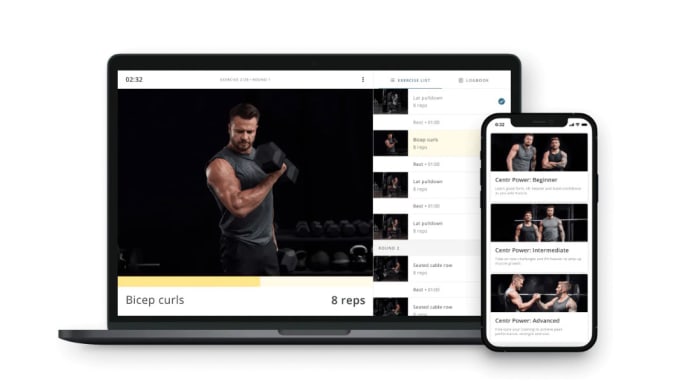
Centr Review: Chris Hemsworth’s Workout App – SI Showcase

Centr Hero Image

The products featured in this article have been independently reviewed. When you buy something through the retail links on this page, we may earn commission at no cost to you, the reader. The Sports Illustrated editorial team is not involved in the creation of this content. Learn more here.

Choosing a fitness app can be difficult because many of the top fitness apps mainly focus on exercise. Therefore, if you are looking to address your health from a more well-rounded approach, making changes to your physical activity, diet and stress management, you often end up needing to download and subscribe to numerous health apps to get a more complete fitness, health and wellness support system.

The Centr app is the brainchild of Australian actor Chris Hemsworth, and is designed to give everyday users access to the knowledge, guidance and motivation from the team of hand-picked, world-class experts chosen by Hemsworth that help him get into peak physical and mental shape. Subscribers get full access to personalized workouts, recipes and training programs, all designed by top-tier professionals to get the body and mind in the best shape.

In this article, we provide a complete review of the Centr app, including what the workouts and training programs are like, what to expect with the meal plans, the meditations offered, who the app is good for, membership fees and how to use Centr.

Centr Key Features

  • Cost: 12 months on sale for $89.99 ($7.50/month), normally $119 ($9.90/month); three months $59.99 ($20/month) or one month $29.99
  • Customizable programs
  • Necessary tech: Compatible with Apple Watch; you can watch Coached Workouts by connecting your app to your smart TV using AirPlay or GoogleCast. If you’re using a web browser on desktop or mobile, you can also cast workouts to your TV using Google Chromecast
  • Compatibility: iOS, Android
  • Nutrition/diet guidance provided: Yes

Pros

  • Free seven day trial for new subscribers.
  • Subscribers get a complete, well-designed health program that combines exercise, diet, mindset and wellness initiatives to help you reach your goals
  • App is easy to navigate
  • Personalized workouts as well as targeted training programs to choose from
  • Ability to swap workouts and recipes provides flexibility
  • Many workouts require minimal equipment, allowing you to work out at home or at the gym

Cons

  • Expensive
  • Can be overwhelming or time-consuming for some people if you take on the entire program (workouts, nutrition and wellness habits)
  • Some recipes take a long time to prepare

What is Centr?

Centr is a personalized digital health and fitness app and program curated by Australian actor Chris Hemsworth. The program, which is available as an iOS or Android app, as well as a web-based platform (via Centr.com), consists of Hemsworth’s hand-picked team of world-class experts in the field of fitness, nutrition, wellness and mindfulness.

Centr membership includes unlimited access to personalized daily workouts, meal plans, meditations, wellness tips and articles and social support through a 24/7 online community of fellow members. Hemsworth has created Centr to be a comprehensive approach to physical and mental health, including the three ingredients he believes are necessary to live a healthy, well balanced and happy life: structured fitness training, eating right and living well by taking care of your mind.

Related: The Best Online Workout Programs

Centr App Interface

During the signup process, the app has intake questions about what your primary fitness goal is (for example, weight loss or building muscle), your dietary preferences (omnivore, pescatarian and vegetarian among others) and how many times you would like to workout each week. You also enter personal details such as your name, gender, height and weight.

Once you input your intake information, the Centr app generates your personalized Planner. Your Planner is where you’ll find your workout for the day and meal plans for the day based on the goals you indicated.

For example, if you indicate that your primary goal is weight loss and you have no dietary restrictions, your meal plan will include breakfast, lunch, dinner and an optional healthy snack that meet the calorie needs based on your body size and activity level.

The Planner also has a “Calm” section with mindset challenges like meditations or sleep visualizations and “Tools and Advice,” which are tips or blog articles relevant to your goals written by the expert trainers, wellness coaches and nutritionists on staff.

You can also see an upcoming calendar for the coming weeks and months to view your exercise plan and meals laid out.

One nice feature is that you can swap out workouts and/or meals in advance. This can be beneficial if you know you’re going to be traveling or have an injury or illness or can’t make it to the grocery store to get all the ingredients on the shopping list. In the section with the suggested workout per day based on your fitness goal, you can also choose between a Coached or Self-Guided workout. The Coached workouts are led by the Centr trainers and the Self-Guided workouts allow you to go entirely at your own pace.

One of the previous downsides of the Centr app was that you were unable to use your own playlists during workouts and connect your Spotify or Apple Music account. However, Centr now allows you to control the audio. You can tap the musical note icon once the workout begins to select your preferred combination of music, trainer and notification beeps.

You can choose to listen to your own music from Spotify or Apple Music, or you can select an Apple Music playlist curated from HemsworthChris and the Centr Team. If you choose trainer, music and beeps, you can still hear beep cues and encouragement from your trainer while jamming to your tunes.

Related: The Best Personal Training Apps

There is a Centr Apple Watch app that allows you to monitor your workout metrics, including your heart rate, during your workout. To do so, you need to pair your iPhone and watch, then open the Centr app on your Apple Watch. Once the app is open on your watch, select the workout you are going to do from your iPhone app. A timer will automatically begin on the Apple Watch and end as soon as it is over without you having to remember to hit “start” or “stop.”

The Centr app integration with the Apple Watch is still pretty minimal. Basically, the Apple Watch app only tracks the workout but you can’t see the specific exercises you are doing.

Overall, the Centr app for Android and iOS is user-friendly and easy to navigate because the interface is simple and clear with no distracting sidebar elements.

Centr Cost and Subscription

All new members can try a seven 7-day free trial of the app, with full access to assess all of the features and try the workouts, meal plans and mindfulness content.

After the seven day free trial ends, Centr subscription fees are based on the length of the subscription you purchase. The 12-month subscription is the best deal. It is normally $119 per year ($9.90/month) billed all at once, but is on sale for $89.99 ($7.50/month). You can also buy a 3-month subscription for $59.99 ($20/month) or subscribe one month at a time for $29.99/month.

Although the price point of the Centr subscription is more expensive than many popular fitness apps, remember that the app fee includes full access to a personalized fitness, nutrition, mindset and wellness plans. If you are interested in guided workouts and a personalized meal plan with recipes, the Centr app subscription can be well worth the money for the content you get.

Working Out With Centr

Hemsworth_Centr

Arguably, the best feature of the Centr app is the robust, varied and effective workouts and training plans. Hemsworth has assembled a team of world-class trainers who develop and lead the workouts and design the training plans based on your goals and fitness level. There are also short-term targeted training programs.

Your workout for the day appears in the Planner, and you can choose a Self-Guided or Coached workout. Depending on your fitness level, primary training goal and number of days you indicated you wanted to train, you may or may not have a workout scheduled for a given day. For example, if you are “advanced” and looking to lose weight, you will have six workouts per week. Centr does encourage listening to your body and taking rest days whenever you need them, even if you are following a specific short-term training program that has you working out most days per week.

One nice feature is that there are usually multiple trainers leading a workout so that you can follow modifications for exercises based on your fitness level. Before the workout begins, you are usually told which instructor will be demonstrating modifications for beginners. These variations on the exercises typically reduce the intensity or impact level for those with injuries or who are just getting started working out. You are also reminded to go at your own pace or rest if the workout gets too difficult.

You also have an option to add extra workouts to your Planner or enroll in any number of the specific Centr training programs like Centr 6, Centr Ignite or Centr Align. These training programs can be found in the Programs section of the app. They are short-term workout programs targeted to specific goals. Most of the Centr fitness programs are also available for each fitness level—beginner, intermediate and advanced—so you can choose the intensity that matches your ability level.

Centr membership gives users access to all the training programs and workouts. There are no premium programs that cost more money, which is great. Furthermore, if you start a training program and decide it’s no for you, you can switch programs or just go back to doing your daily workout in the planner without following a specific training plan.

The top Centr training programs include the following:

Centr Power

Centr Power is primarily targeted at building muscle (hypertrophy training), and is a gym workout program designed by Chris Hemworth and his personal trainer, Luke Zocchi.

  • Program Length: 10 weeks per level
  • Training Style: Hypertrophy (building muscle)
  • Required Equipment: You will need access to a full gym
  • Fitness Level: Three progressive levels: Beginner, Intermediate and Advanced options
  • Primary Trainer: Bobby Holland Hanton (Chris Helmsworth’s stuntman)

Centr Fusion

Centr Fusion is a hybrid workout program that progresses in difficulty, with varied workouts and trainers. It also features weekly mindfulness themes.

  • Program Length: Six weeks
  • Training Style: Hybrid training (BoxHIIT, Strength, MMA and PowerFlow)
  • Required Equipment: A workout mat and dumbbells
  • Fitness Level: Beginner to Intermediate, with modifications for both fitness levels are demonstrated during the workout on the screen at the same time
  • Primary Trainers: Ashley Joi for strength training workouts, Michael Olajide Jr. for BoxHIIT workouts (boxing-infused HIIT) and Tahl Rinsky for PowerFlow workouts (described as “yoga-meets-functional-strength-meets-cardio”)

Centr Unleashed

Centr Unleashed is a bodyweight strength training and cardio workout program that has different workouts that evolve as your fitness improves. There are HILIT modifications for every ability level to make the program suitable for everyone.

  • Program Length: Six weeks
  • Training Style: HIIT/HILIT bodyweight training (high-intensity interval training and high-intensity low-impact training)
  • Required Equipment: No equipment required
  • Fitness Level: Beginner to advanced; you choose your level before you begin the training program
  • Primary Trainers: Luke Zocchi and Ashley Joi with bonus challenges from Dan Churchill and a weekly stretching session to aid recovery

Centr 6

Centr 6 is Chris Hemsworth’s favorite way to train with minimal equipment when he’s on the road, performing both cardio and strength training exercises. It’s a great program for at-home workouts and is designed to kickstart your fitness goals or get you back in shape after time off.

  • Program Length: Six exercises, six rounds performed six days a week for six weeks
  • Training Style: Cardio and strength training
  • Required Equipment: Bodyweight and a set of dumbbells or adjustable dumbbells
  • Fitness Level: Beginner to advanced, with modifications for all fitness levels are demonstrated during the workout on the screen at the same time.
  • Primary Trainers: Luke Zocchi, Ashley Joi and Da Rulk

Centr 6: Phase II

The follow-up program to Centr 6 that builds on the intensity and difficulty as your fitness improves. You don’t have to complete the Centr 6 training program first.

  • Program Length: Six exercises, six rounds performed six days a week for six weeks
  • Training Style: Cardio and strength training
  • Required Equipment: Set of dumbbells or adjustable dumbbells
  • Fitness Level: Beginner to advanced; you choose your level before you begin the training program.
  • Primary Trainers: Luke Zocchi, Ashley Joi and Da Rulk

Centr Align

Centr Align is a body and mind program that infuses Pilates and yoga along with mindfulness-based exercises and breathwork to tone and align your body and build confidence.

  • Program Length: Four weeks
  • Training Style: Yoga and Pilates
  • Required Equipment: No equipment required
  • Fitness Level: Beginner to intermediate, or anyone needing a body/mind restore
  • Primary Trainers: Tahl Rinsky for yoga and Sylvia Roberts for Pilates, with guest appearances from Luke Zocchi and Bobby Holland Hanton.

Centr Masterclass: Da Rulk

The Masterclass Da Rulk training program focuses on functional training to help you improve how your body moves during everyday activities of daily life.

  • Program Length: 13 sessions
  • Training Style: Functional training
  • Required Equipment: Bodyweight only
  • Fitness Level: Beginner to advanced; everyone progresses through the program the same way: Beginner (five sessions), Intermediate (four sessions) and Advanced (four sessions).
  • Primary Trainers: Joseph “Da Rulk” Sakoda

In each training program, all of the workouts provide clear guidelines regarding the necessary equipment, the duration of the workout, the fitness level and the trainer who will be leading the class before the workout begins so that you can make sure you are ready and that it will be a good fit.

You can even watch the coaches demonstrate the moves one by one before the workout begins so that you’ll know how to do them when they come up in the workout. This is a major benefit of Centr for beginners. Using proper form and technique during training is important to not only reduce the risk of injuries, but also to increase the effectiveness of an exercise. However, if you’re trying to keep up with the pace of the trainer and you’re unfamiliar with the exercises, it can be overwhelming and difficult to feel confident that you’re doing things correctly and getting the most out of the workout. You can also return to these instructions later on to master the technique if you feel unsure.

Nearly all of the training programs include a warm-up, or the trainer ensures you are warmed up before you get moving with high-intensity exercises. The trainers also perform the moves and point out modifications for different fitness levels during the workout, and provide lots of motivation and uplifting words of encouragement.

Another benefit of Centr workouts is that very few require equipment, and those that do tend to need little more than dumbbells, a jump rope or one or two kettlebells. Again, you can see the required equipment before the workout begins to make sure you have the necessary fitness gear if you’re doing at-home workouts. If you see that a workout requires equipment that you don’t have in your home gym, you can swap out the workout for another one that works with your setup.

There are also specific Centr training programs that require no equipment at all, such as Centr Unleashed, which is solely bodyweight workouts. The minimal equipment or bodyweight workout plans are great for those doing at-home workouts, but if you are working out at the gym, there are programs that recommend using additional weights, such as medicine balls and barbells.

Centr encourages community and social support, particularly when you are taking on one of the programs. Subscribers have access to the free Facebook community, where you can meet others doing the program and find support, ask questions and build motivation to tackle your workouts and diet goals.

Centr Nutrition and Recipes

One of the central tenants and major features of the Centr app is the nutrition and recipes arm of the wellness program. Chris Hemsworth doesn’t get his sculpted body just by exercising.

Your personalized meal plan appears in the daily Planner. The recipes that are created for your meals are based on your dietary preferences, weight loss or muscle-building goals, activity level and body size.

The nutrition section of the app is surprisingly robust. You will see the daily menu for your meals (and snacks if included), as well as detailed recipes that provide clear information about the prep time, cooking time, necessary ingredients, number of servings, serving size, cooking method and nutrition facts for each serving.

One of the best features of the Centr diet section is that you can choose to increase the number of servings for a recipe and then the app automatically adjusts the amount of each ingredient that you will need. You can have the option to add all of the ingredients to a shopping list that you can use by pulling up the app at the grocery store. You can also bookmark your favorite recipes so that you can come back to them or swap your top picks in when you see a meal come up in your Planner that doesn’t look appealing to you.

User reviews typically note that the recipes are fairly easy to follow, and even though they are inherently designed to be quite healthy, most of the recipes seem to gain crowd approval and are said to be flavorful and satisfying. Some of the most popular Centr recipes include the burger salad bowl with honey mustard dressing, chicken pan roast with carrots, lentil lasagne with cauliflower cashew cheese and chocolate drizzle protein bars.

Related: The Best Weight Loss Programs for Women

Meditation

There are over 150 Centr meditations and mindfulness exercises. Depending on the goals that you establish when you sign up, and any specific training programs you enroll in, you might have anywhere from one to multiple recommended meditations or mindfulness activities per week.

Membership also includes free enrollment into specific meditation programs and series. For example, one of the most popular Centr meditation programs is the seven 7-day Learn to Meditate series narrated by Hemsworth himself. The goal of this series is to establish a routine for daily mindfulness meditation. Each daily meditation “workout“ takes less than 10 minutes, and covers one of a variety of themes including stress release, sleep visualization, breathing, focus, body scanning and peak performance. After you finish this series, you will gain access to the hundreds of meditations and sleep fed visualizations in the app.

This beginner series is a great way to introduce beginners to meditation in a non-intimidating, gentle way. When the Learn to Meditate series is complete, you’ll have access to the hundreds of meditations and sleep visualizations already on Centr to keep you moving forward.

These standalone meditations and sleep visualizations cover all sorts of topics and themes, such as “how to heal in a relationship” or “judge less, live lighter,” as well as meditations specifically for kids that you can play for your little ones. Most of the meditations are very short, lasting 10 minutes or less.

Equipment Needed to Use Centr

One of the benefits of the Centr workouts is that many require minimal equipment, or can be performed with bodyweight alone. This is ideal for anyone who wants to exercise at home or does not have access to a gym. With that said, some of the targeted training programs do require dumbbells, an exercise mat and a jump rope. Additionally, the muscle-building program, Centr Power, requires access to a full gym. Before you begin any workout, you can see what type of fitness equipment you will need to complete the exercises.

If you do not have something on the list, you can simply swap out the workout for another option that doesn’t require exercise equipment that you do not have. If you do want to do most of the training programs at home, investing in a set of adjustable dumbbells is ideal, and will allow you to perform nearly all of the workouts (except for Centr Power and a few other individual workouts).

Is the Centr App Right for You?

Music_Centr

One of the primary benefits of Centr, is that compared to many of the other top fitness apps, Centr doesn’t just focus on exercise, or just diet or just mindset. Rather, Centr can be viewed as a comprehensive wellness app that helps you focus on your body and mind, targeting your health with a holistic approach.

Therefore, Centr is ideal for anyone looking for a comprehensive, structured approach to improving their physical and mental health. If you have been underwhelmed with the effectiveness of just following workouts, or just following a meal plan, and want one wellness app that unifies all of the “ingredients” needed for a healthy lifestyle into one clearly laid out plan tailored to your personal goals and needs, Centr can be a great option.

Centr is also great for people who like variety in their workouts. You can swap out different workouts and choose different training programs based on your goals and available equipment. There are new workouts, recipes and meditations added weekly, keeping even long-time members engaged with fresh content.

With that said, because Centr is designed to take a holistic, multi-pronged approach to your wellness, it can be a bit overwhelming for those who lead busy lives and don’t feel that they have the time or energy to devote to training, cooking and meal preparation as well as mindfulness and meditation all in one day every single day.

However, it’s your wellness journey and Centr makes it clear that you should listen to your body, take rest days when necessary, go at your own pace and take whatever strides you can towards improving your health. You don’t have to be perfect, and you don’t have to choose an intensive routine that has you training every day of the week. If you are interested in the Centr App but have a hectic schedule, limited time to train or are a complete beginner, just start small. Try a couple of workouts per week, choose one or two recipes to follow per day and test out a stress reduction technique once or twice a week. Start establishing healthy habits that you enjoy and build from there. The app will grow with you on your fitness, health and wellness journey.

Related: The Best Weight Loss Apps

Centr FAQs

Is Centr good for building muscle?

Your personalized Centr workouts and meal plan can help you build muscle if you indicate muscle building as your primary goal when signing up for the app. You can also take on Centr Power, which is a gym workout program specifically targeted towards building muscle.

Does Chris Hemsworth use Centr?

Yes. Centr reflects the knowledge and routines that Chis Hemsworth has learned about achieving and maintaining a healthier body and mind over his life. He has assembled a group of elite trainers, chefs, nutritionists and wellness professionals to support his own health and wellness journey and the Centr is his way of bringing access to these experts and routines to everyday users.

Does Centr have a diet plan?

Yes. Centr includes a diet plan with a meal plan for breakfast, lunch and dinner for each day with healthy recipes to follow. You can swap out recipes if they don’t meet your diet plan needs or food preferences. There are pescatarian recipes, vegetarian meals and meal plans for other dietary restrictions. You can also curate a shopping list with the ingredients you’ll need for the diet plan for the week based on the number of servings of each recipe you are making.

Can you cancel Centr before the free trial ends?

Yes. You can cancel your Centr subscription anytime on the platform where you created your user account. You must cancel before the end of the seven day free trial or you will be charged for the Centr subscription after the seven day free trial ends.

Is the Centr app good for beginners?

Absolutely. Centr workouts can be tailored to any fitness level. Almost all of the Centr programs and workouts have modifications for beginners and you can always take extra rest days, go at your own pace or skip movements that are too difficult. There is usually one trainer you can follow in the workout that demonstrates low-impact beginner modifications in case you aren’t sure how to decrease the intensity of an exercise.

Does the Centr app work with Apple Watch?

Yes. The Centr app works with the Apple Watch as long as your iPhone is paired with the Apple Watch first. By connecting your workouts to your Apple Watch, you can get a deeper analysis of your workout stats, including your heart rate, through Health Kit.

Final Thoughts

Overall, the Centr app is very well received by users and most people find it to be particularly helpful in terms of planning your exercise and diet for both the short term (day- to- day) and long term. The comprehensive nature of the fitness app takes a well-rounded approach to health, addressing not only the body through both exercise and nutrition, but also the mind through mindfulness, wellness rituals, stress reduction and yoga. Although the membership is pricey, Centr is a great value given all that it offers.

Prices are accurate and items in stock as of publish time.